Product updates
Private agent memory
The AI bid manager can remember stable preferences and work habits across conversations. Your memories stay private, visible, and easy to change or delete at any time.
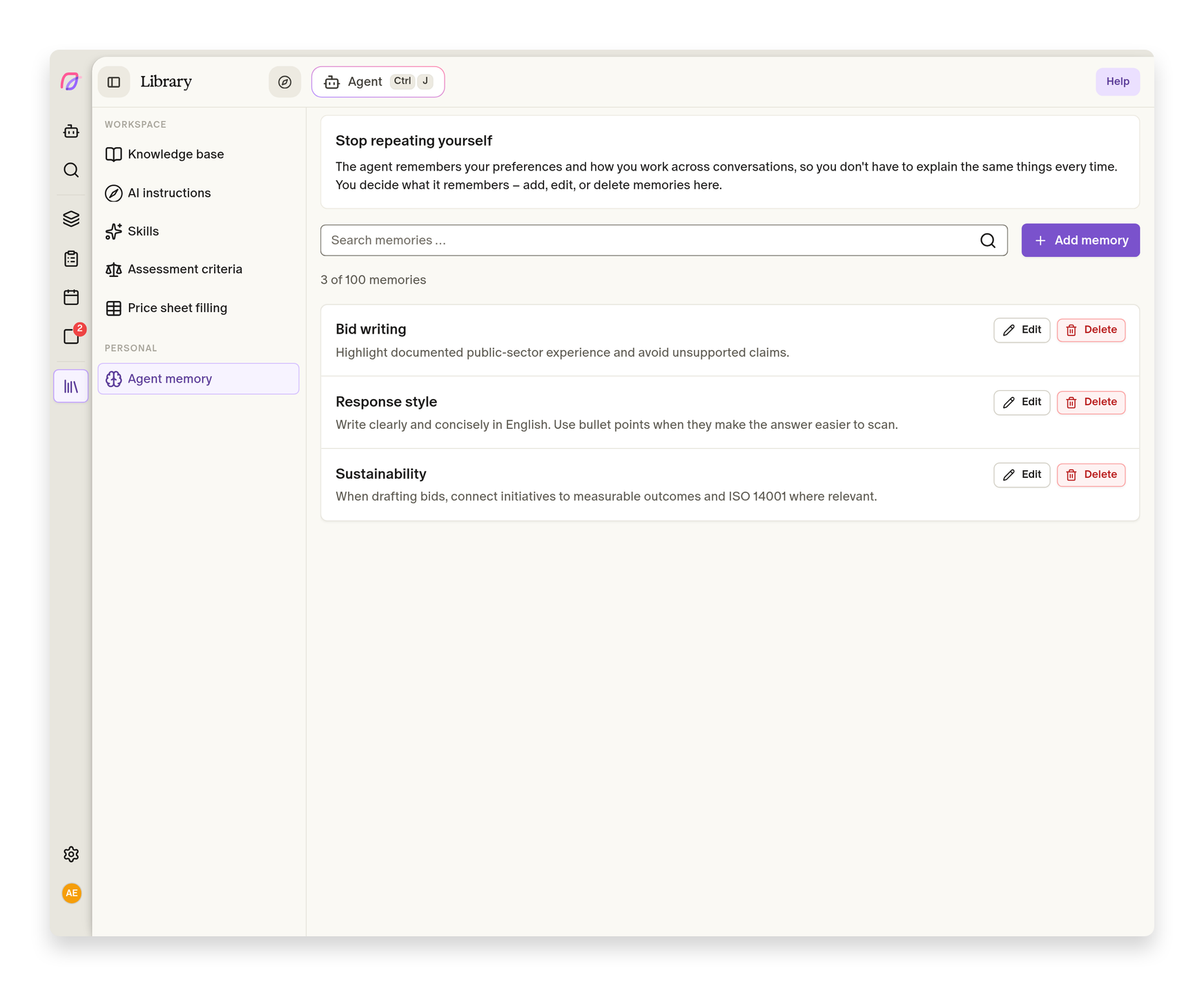
When you work with the agent over time, repeating the same preferences and work habits in every new conversation gets tedious. You can now ask the agent to remember what should carry forward, without sharing those memories with anyone else.
Your way of working carries into the next conversation
Ask the agent to remember a stable preference or work habit as part of an ordinary conversation. This might be how you prefer answers to be structured, a working method you use often, or another lasting choice that makes your collaboration more relevant. You can also ask the agent to update a memory when your needs change, or forget it when it no longer applies.
Memories are private to you. This remains true when you are working with colleagues in a shared workspace or bid. Other users do not receive your memories, and their memories do not affect how the agent responds to you.
The agent uses only memories that are relevant to the conversation at hand. Previous preferences can therefore help when they fit, without everything you have saved being pulled into every answer. Safeguards reject secrets and payment details, so agent memory is intended for work habits and preferences rather than sensitive storage.
You can see and control everything the agent remembers
When a memory is added, updated, or removed through conversation, the change appears directly in the chat. If the agent interpreted your request incorrectly, you can undo it immediately and carry on without hunting for a separate setting.
The full overview is under Library → Agent Memory. There you can add memories yourself, search them, edit their contents, rename them, and delete them. This makes it easy to tidy up when your way of working changes and to control exactly what the agent can use in later conversations.
Use the conversation for a quick change and the library when you need the complete picture. Memories remain tied to your user and are managed in one place, whichever workspace or bid you open. The agent and agent memory are also documented in the help centre.
More improvements
- AI bid manager
Type
/in the message field to find and select one of your team's skills before sending. - AI bid manager
The agent uses the account language when the desired reply language is unclear.
- Proposals
Open text documents update live while the agent writes.
- AI bid managerMalformed action links render as usable buttons.
- Proposals
New documents created by the agent appear in the bid workspace.