Product updates
Keyboard and safer actions
The command palette now carries the page's own actions and the same key hints everywhere, and actions you cannot undo ask for confirmation first.
If you work in Cobrief all day, you would rather not move your hand to the mouse just to change page or start a new tender. At the same time, some actions did serious things in one click without asking, such as restoring an old version of a document everyone else was working in. The past two weeks went to both.
The command palette takes you where you are going
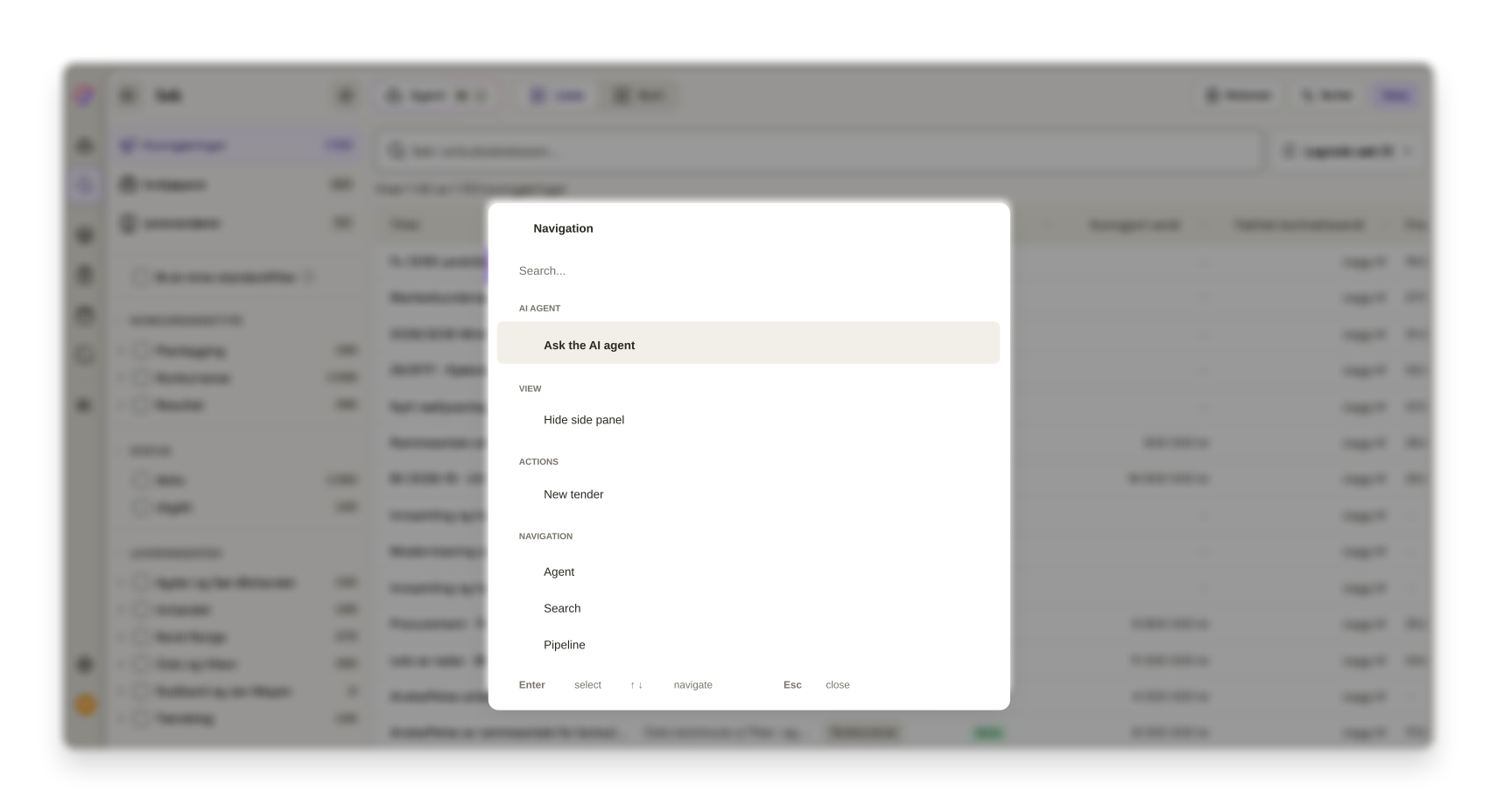
⌘K, or Ctrl+K on Windows, opens the palette anywhere in the app. It now carries the page's own actions too, not just navigation. When you are in search, Hide side panel and New tender sit where you expect them, alongside Ask the AI bid manager.
Key hints look the same across the app: the key first, the explanation after. Windows users see Ctrl where ⌘ used to be hardcoded. As soon as you start typing, the selection jumps back to the first hit, so Enter does what you expect, including after you have cleared the search field and typed something new.
The shortcuts are collected in the help centre.
Actions you cannot undo ask first
Restoring from the version history used to write back the whole document, for everyone who was in it, in one click and with no explanation. Now a confirmation names the date you are restoring to, and the preview says clearly which version you are looking at. The version list has the full date on each entry and a badge on the current one.
Error messages no longer vanish before you have had a chance to read them either. Notifications have a close button, handle several lines of text, and errors carrying a reference ID stay until you close them yourself.
And an important fix for everyone who submits on Word templates: exporting filled-in templates could truncate the document and lose answers if a field spanned several paragraphs. That is fixed, and filling in templates now keeps the whole content.
Accessibility across the app
- User management
The collapsed menu rail can be operated with the keyboard.
- Proposals
Edit and delete on comments are reachable with both keyboard and touch.
- User management
Modals have accessible names, and tables tell assistive technology how they are sorted.
- User management
Tooltips are tied to the button they belong to, so screen readers read them out.
- Tender search
The remove button on filter chips in the insight panels can be reached with keyboard and touch.
- User management
Icon buttons without visible text have names, and each action uses one and the same icon across the app.
- User management
Grey tones and text sizes have been reviewed for legibility, in both light and dark mode.
Smaller fixes and polish
- Proposals
Enter behaves the same way in every comment field.
- Proposals
A document that fails to load shows a skeleton and "Try again" instead of an empty page.
- Proposals
Uploads no longer disappear quietly if the file dialog survives a page refresh.
- Proposals
Tasks in the bid room are sorted server-side, and the board view has visible filters and search.
- ProposalsThe move-to-folder dialog works again.
- MobileThe upgrade modal is usable on a phone.
- AI bid manager
The knowledge base shows the correct "Last modified".
- Tender search
Loading states in logged-out search and on the tender page are fixed.