Product updates
New agent surface with Coby
The agent surface has been rebuilt. You can see what the agent is doing while it works, and write your next message instead of waiting for the answer.
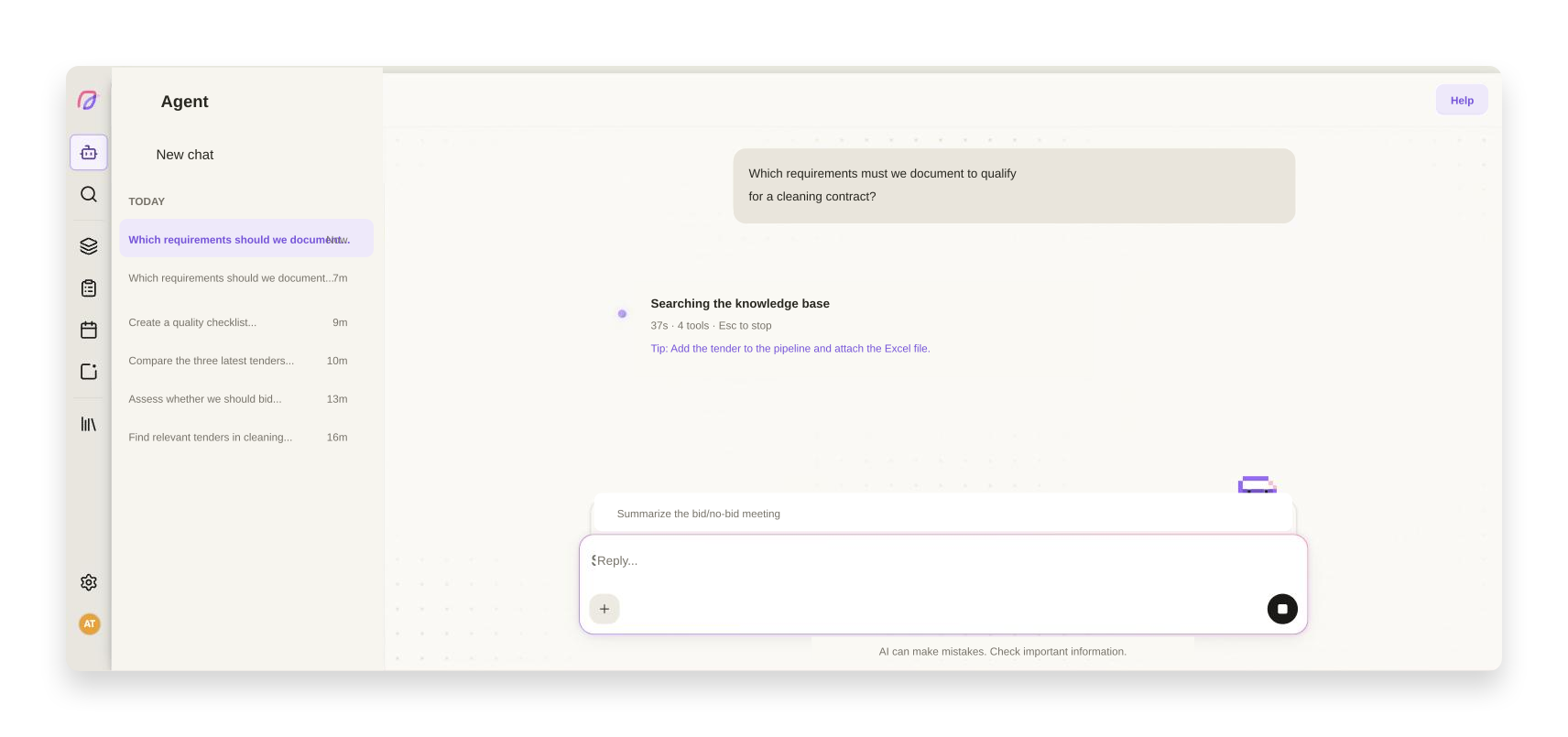
Handing a task to the AI agent and then watching a spinner is a poor use of your time. You cannot tell whether it understood the task, how far it has come, or whether waiting is worth it. We have rebuilt the whole agent surface around two questions: what is happening right now, and what can you do in the meantime.
You see what the agent is doing while it does it
The status line tells you what the agent is working on, how long it has been at it, and how many tool calls it has made. If you want to interrupt, Esc sits right there in the same line as a visible reminder.
Open the reasoning and it reads like a story rather than a raw log. Repeated steps collapse into a single line with a count, "Searched the knowledge base · 3 times", instead of quietly disappearing. The steps hang together as a tree, and long thoughts are cut with an explicit "Show N hidden lines" rather than being silently truncated. The heading summarises the turn as a whole, not whichever step happened to come last.
While you wait, the surface shows short tips about things in Cobrief you may not have picked up yet. And when the agent uses a skill, such as the built-in skill for writing bids, it is named in the chat.
You can write the next message while Coby works
If you have already thought of your next question, write it straight away. Press Enter while the agent is working and the message is queued behind the composer instead of interrupting it. The queue takes several messages, and you can edit or remove them for as long as they sit there. When you really do want to stop, use Esc or the stop button.
If the agent asks a question along the way, you can minimise it to a slim strip above the composer, read the context behind it in peace, and bring the question back up. Before, you had to close the card to read the summary, which left the question unanswered.
Coby, peeking over the edge of the composer, is not just decoration. He shows whether the agent is thinking, waiting for you, or done.
The agent surface is documented in the help centre.
More improvements to the agent
- AI agent
Tables and data blocks in answers render as real tables and code blocks with a copy button, instead of running text.
- AI agent
Long choice lists in the agent's questions have search and clearer keyboard navigation.
- AI agent
Every agent answer has a copy button, and the last answer can be regenerated.
- AI agent
The tab title tells you when the agent has finished or is waiting for an answer, so you can work in another tab while it runs.
- AI agent
Attachments appear as their own cards with upload status, and upload errors are translated and understandable.
- AI agent
Below the composer, the suggestions cross-fade into keyboard shortcuts as soon as you start typing.
- AI agent
The welcome screen and "Recent projects" have been tightened up to match the rest of the surface.
- Proposals
The approval card in bid work now follows the same pattern as the other question cards.
Smaller fixes and polish
- Mobile
Fixed an issue where the agent surface could not be scrolled vertically on mobile.
- AI agent
The stop button releases the composer immediately, and no longer lights up when it is disabled.
- AI agent
The seconds counter in the status line no longer resets when you reload the page.
- AI agent
The out-of-AI-capacity notice stacks instead of being cut off on narrow screens.
- AI agent
Long question titles are clamped instead of bursting the dialog.
- AI agent
Fixed an issue where empty agent threads could be created.
- AI agent
The agent chat scrolls correctly again while answers stream in.