Automatic Excel Filling and Other Updates

We're continuously improving Cobrief to simplify your tender work. Read about automatic Excel filling, smarter CPV codes, faster onboarding for new companies, and an improved task overview.
We're continuously working to improve Cobrief and simplify your tender work. Here are some of the most important updates from recently:
Key Takeaways
- Automatic Excel filling: Cobrief now fills out pricing sheets and requirement specifications in Excel automatically.
- Smarter search: The AI now suggests the most relevant CPV codes based on the content of the tender.
- Faster onboarding: New companies can now set up their profile using just their website URL.
- Better control: The task overview has been upgraded for better team collaboration.
Let's dive a bit deeper into these updates:
Excel Magic and Smarter Codes
Tired of Excel stealing your time? Here's the solution:
- No more manual Excel hassle: Cobrief now fills out Excel files automatically, just like we do with Word. Pricing sheets and requirement specifications are pulled directly from your library.
- Accurate CPV codes: Cobrief now analyzes the actual text of the tender notice and suggests relevant codes, so you don't miss your dream tender.
Easier Onboarding for New Companies
Want to recommend Cobrief to someone? Now is a great time, because we've made it even faster to get started:
- Enter your website – we handle the rest: Type in your company's URL, and our AI understands what you do and fills in the information for you.
- Recommended service areas: You now get ready-made suggestions for which areas suit your business.
- Smarter evaluation criteria: All users now get suggestions for custom criteria relevant to the specific tender they're looking at.
Improved Item Picking
You can now add instruction templates and extra columns to make picking even better and easier to understand. You can ask the AI to add:
- Ready-made instructions: Create reusable instruction templates, e.g., "use eco-labeled products in all picks," and easily apply them to the picks you want.
- Confidence level: Indicates how confident the AI is that the product selection is correct (Low, Medium, High).
- Pick comment: An explanatory comment for special selections or deviations.
- Alternative pick: Adds columns for an alternative product selection (item number and product name), as well as mirrored columns for other selected extra columns.
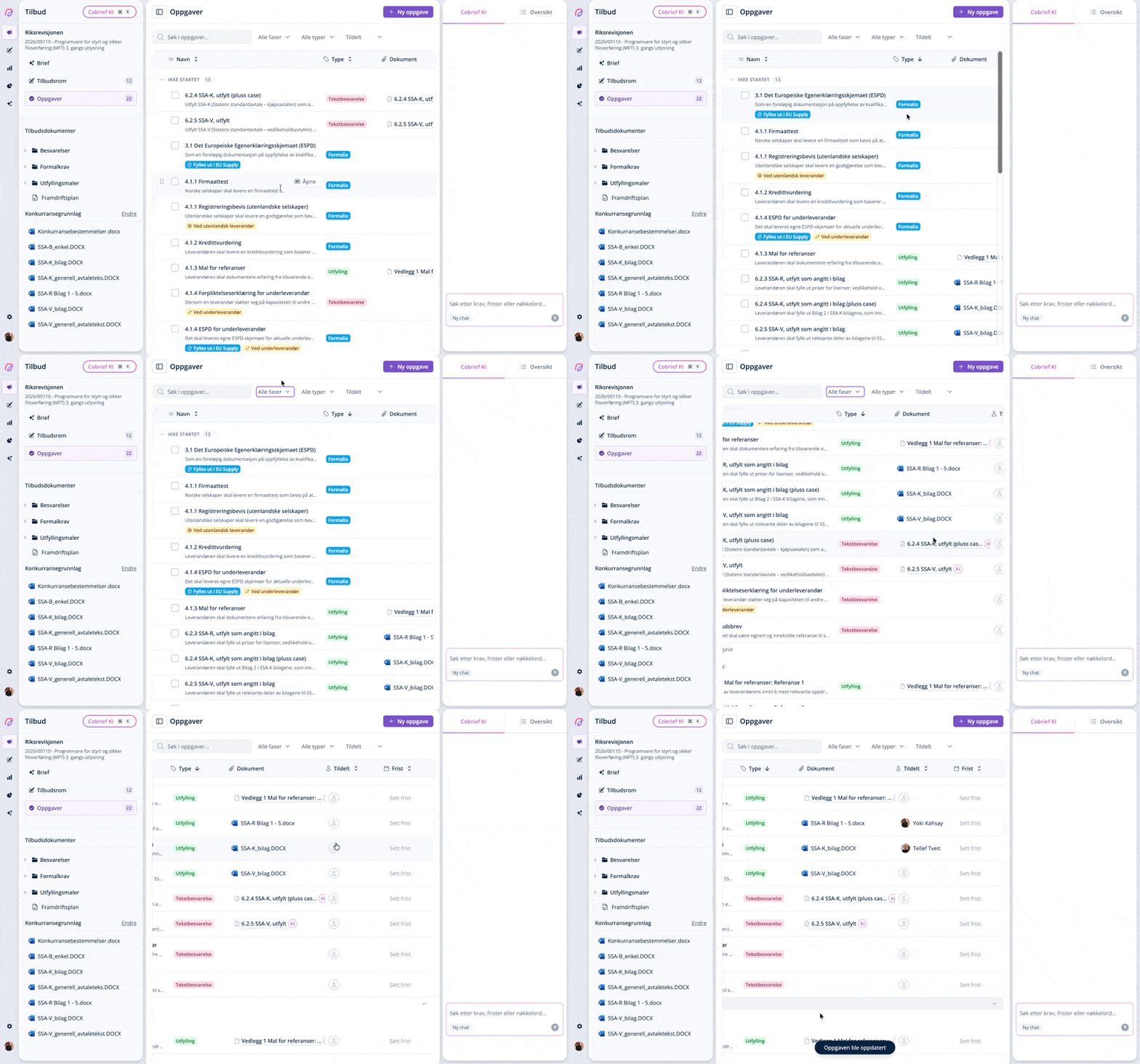
Task Improvements
Tasks are now more organized, allowing you to easily see who is responsible for a task, what type of task it is, the deadline, and to search and filter.
Small Changes That Make a Difference
Here are some smaller adjustments that simplify your tender work even more:
- Personal profiles: You can now change your profile picture! It makes it a bit nicer to see who on the team has things under control.
- Tidier bid rooms: We've moved document uploads closer to the brief and made the folder structure more logical.
- Quick buttons: Create proposals directly from the assessment page, or use the new button for lightning-fast downloads.
Faster and More Stable
Under the hood, we've tweaked things here and there so everything feels smoother. Pages load faster, search is more precise, and we now have full control over company names directly from the Brønnøysund Register Centre.
Wondering how to use the new Excel features?
We've updated our help center with a step-by-step guide: How automatic Excel filling works
Cobrief + Flowcase = A Perfect Match
We've made it even easier to find and tailor CVs for your tender. Our AI now has direct access to Flowcase, so you no longer have to manually search for CVs and reference projects.
- Find the right people: Ask the AI to find the most relevant candidates for a tender. It understands what you're looking for, even when the CV uses different wording than the tender notice.
- Automated writing: Use data directly from Flowcase to fill out proposal templates, write team presentations, or answer questions about employees' experience directly in the chat.
- Always up to date: Since the data is fetched straight from the source, you can trust that the information in your tender is actually accurate.
The feature is already enabled for all users with a Flowcase integration.
Have questions or suggestions for what we should fix next? Click the help button in the app or send us a message.